
PayMyDoctor & Online Medical Bill Payment Guide
If you searched for PayMyDoctor, you probably have a medical bill in front of you and you want to pay it online without a lot of fuss. That is a reasonable thing to want, and this guide exists to help you do it with fewer surprises. We explain what the name PayMyDoctor usually refers to, how online medical payment portals generally work, how to find the one that belongs to your bill, and what to check before you type in a card number.
ℹ️Independence notice. PayMyDoctor Online is an independent informational website. We do not process medical payments, access patient accounts, or represent healthcare providers or payment portals. Always follow the payment instructions on your medical statement or confirm the correct payment website directly with your healthcare provider.
We are not the payment website. Nothing on this page lets you pay a bill, and we will never ask for your account number, your card details or your Social Security number.
Think of us as a well-informed friend who has read a lot of billing statements and wants to save you a wrong turn.
Start in three steps
- Find your statement and the payment address printed on it.
- Type that address yourself and check that the balance matches.
- Pay, save the confirmation and look for the payment on your next statement.
💳What does “PayMyDoctor” actually mean?
Plain and simple, “pay my doctor” is a phrase people type when they want to pay a medical bill. It describes a task, not a single company.
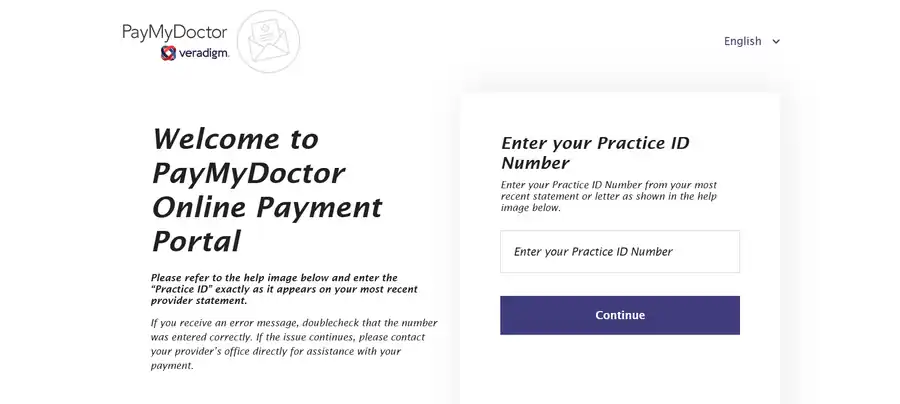
Over the years, several organizations have used some version of the name in their web addresses, including payment pages that sit on a medical practice’s own website and pages run by billing companies that handle statements for many practices. If you have seen paymydoctor.com on a statement, that is a specific web address.
If you simply searched for the words, you were looking for a way to pay.
That difference matters more than it sounds. Two sites with similar names can belong to completely unrelated organizations, and only one of them may be connected to your doctor.
Our dedicated PayMyDoctor guide goes into the naming question in detail, including how to tell whether the page you found is the one your provider actually uses.
ℹ️Why so many similar names exist
Billing is one of the least glamorous parts of healthcare, and every practice sets it up in its own way. Some use software built into their electronic records.
Some hire an outside billing company. Some use a payment vendor that provides a hosted page. Each of those choices tends to produce a different website, and many of them end up with friendly, descriptive names like “pay my doctor” or “pay my bill” because those names are easy to remember and easy to print on a statement.
🔎What people searching for it usually want
There are four common goals. Some people want to pay a bill right now and are looking for the address. Some received a bill and are not sure it is legitimate.
Some cannot find where to pay at all. And some are curious how online payment works before they try it. We wrote this site for all four.
🌐How online medical payment portals generally work
A medical payment portal is a website where you can look up a balance and pay it. Beyond that basic description, portals vary quite a lot. It helps to know the three common shapes.
- 🌐A payment page on a provider’s own website. You reach it from the practice’s site or from a link on your statement. It usually asks for a few details to find your bill and then takes a payment.
- 🧾A page run by a billing company. A company that handles statements for one or more practices hosts the page. The practice may not appear much on the page itself, but your statement points you there.
- 🌐A full patient portal. A secure login, often tied to your health records, where billing is one feature next to appointments, messages and test results. We explain this type in our guide to patient payment portals.
In every case, the basic sequence is similar. You identify yourself or your bill, the portal shows what you owe, you choose a payment method, and the portal gives you a confirmation.
What differs is the exact wording, the information you must provide, whether you need an account, and which payment methods your provider has turned on. This is why we keep saying that the details vary by provider.
It is not a hedge. It is the most honest summary of how the system works.
If you want a deeper look at what happens behind the screen, our explainer on how online medical bill payment works walks through it.
🌐How to find the right payment portal for your bill
The single most useful habit is also the simplest: start with the paper. Your statement, or the email that came with it, is the most reliable source for the payment address.
Look near the bottom, where the payment coupon usually sits, and in the small print at the top or side. Many statements list a website, a phone number and sometimes a QR code.
- Find the most recent statement or notice for the bill in question.
- Look for a web address, a QR code or a phone number for payments.
- If you only find a phone number, call it and ask which website to use.
- If you find nothing, visit your provider’s own website and look for a “pay my bill” or “billing” page.
- If that still does not work, call the main office and ask for the billing department.
What we would avoid is typing the name into a search engine and clicking the first result. Search results can be useful for learning, but they are a poor way to decide where to enter payment details, because look-alike sites exist.
Our walkthrough on finding your medical payment portal covers the less obvious cases, such as when you received several bills for one visit.
🏥Paying a doctor bill or hospital bill online: the short version
Here is the quick version. We keep a much longer one on our How to Pay a Medical Bill Online page, with extra detail on billing errors, unrecognized bills and safety.
- Find the statement and note the account or statement number, the amount due and the due date.
- Use the payment address printed on the statement, typing it yourself if you can.
- Enter the details the page asks for so it can find your bill.
- Check that the name and balance match your paper statement.
- Choose from the payment methods offered and enter your details on the secure payment screen.
- Save the confirmation number or receipt, and look for the payment on your next statement.
Doctor bills and hospital bills follow the same general pattern, but they feel different in practice. A hospital stay often produces several separate bills from the facility, the doctors who treated you and sometimes a lab or imaging group.
Each may live on a different payment page. Our article on doctor bills versus hospital bills explains why that happens.

❓Information you may be asked for
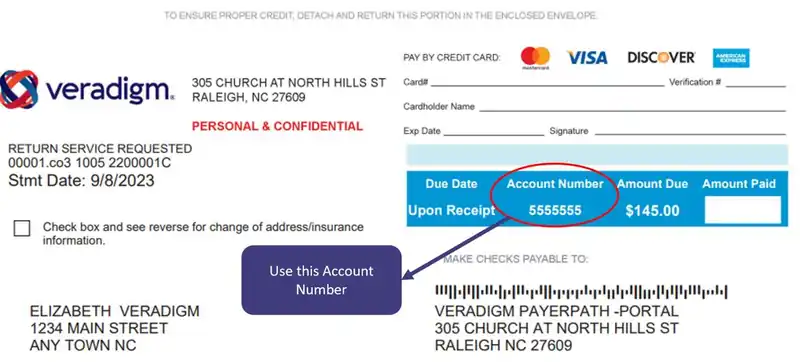
Requirements vary, but patients are commonly asked for some combination of the following:
- An account number or statement number from the bill
- The patient’s name, and sometimes date of birth
- A zip code or other identifying detail
- A payment method, such as a debit or credit card, or in some cases a bank account
A payment page does not normally need your Social Security number, a password for your email or your medical history. If a page asks for any of those just to make a payment, close it and call the billing office.
There is a longer checklist in our article on what information you need to pay a medical bill.
🗂️Confirmations and receipts
After a successful payment you should see a confirmation on screen, and many portals also send an email. Save the confirmation number, take a screenshot and, if there is a receipt option, download it.
A few days later, check that the payment appears on your next statement or in your online account. If you want a system for keeping all of this together, see how to keep medical payment records.

💳Read the bill before you pay it
It is tempting to treat a payment page as a finish line. But a bill can be wrong, or it can be premature.
Insurance may still be processing the claim, a service may be listed twice, or a charge may belong to a different patient. Paying first and sorting it out later is possible, but it is usually slower and more annoying than checking first.
A few quick checks help. Compare the date of service with your own memory of the visit. Look at whether insurance payments and adjustments appear.
If you have an Explanation of Benefits from your insurer, compare the amount you owe on each. The Explanation of Benefits is not a bill, and it is the document most likely to tell you whether the number on your statement is right.
Our guide to checking a medical bill before paying shows how to do this step by step, and understanding patient billing statements breaks down the layout.
If you were uninsured or chose not to use insurance, you may have been entitled to a good-faith estimate of costs before your care. The federal government explains these protections at CMS.gov/nosurprises.
It is worth a look if a bill is much higher than you were told to expect.

🛠️Common problems and what to do about them
Most payment problems are ordinary and fixable. Here are the ones people mention most often.
- 🌐The account will not come up. Re-check the digits and any prefix. If it still fails, call the billing office, because the account number on a statement is sometimes formatted differently from what the page expects.
- 🧾The balance looks wrong. Do not pay yet. Compare it with your Explanation of Benefits and call the billing office.
- 🧾You cannot find the bill online. It may not be posted yet, or it may belong to a different provider. See what to do if you cannot find your bill online.
- 💳The payment fails or the page freezes. Check your card or bank activity before you try again, so you do not pay twice. We explain this in what to do if an online medical payment fails.
- 🧾You do not recognize the bill. Contact the provider using a phone number from a source you trust, not from the bill itself.
💳Payment methods you may see
Which payment methods appear depends on the provider and the payment vendor they use. Debit and credit cards are the most common.
Some portals also accept direct bank payments. A few offer digital wallets, and some do not offer any online option for certain accounts.
If a method you expected is missing, that is usually a setting on the provider’s side, not something you did wrong.
Fees are worth a quick thought. Some providers add a processing fee for certain payment types, and others do not. A well-run payment page should show any fee before you confirm.
If the final screen shows an amount that is different from your balance, back out and ask the billing office what the difference covers.
💳Paying from your phone
Plenty of people pay medical bills from a phone, and most payment pages open in an ordinary mobile browser. A few habits help.
Type the address from your statement instead of tapping a link in a message you did not expect. Avoid public Wi-Fi when you enter card details.
And take a screenshot of the confirmation before you close the page, because email receipts sometimes arrive late or land in a spam folder. We cannot promise how any particular portal looks on your device, so treat our advice as general.
💳If you cannot pay the full amount
A bill is not always a take-it-or-leave-it number. Many providers offer payment plans, and many hospitals have financial assistance policies, which tend to be published on their websites or available from the billing office.
It is reasonable to ask what options exist before you pay or before a bill goes to collections. A short phone call can change the number or the schedule, and it is better to make it earlier than later.
Keep notes on who you spoke with and what was agreed.
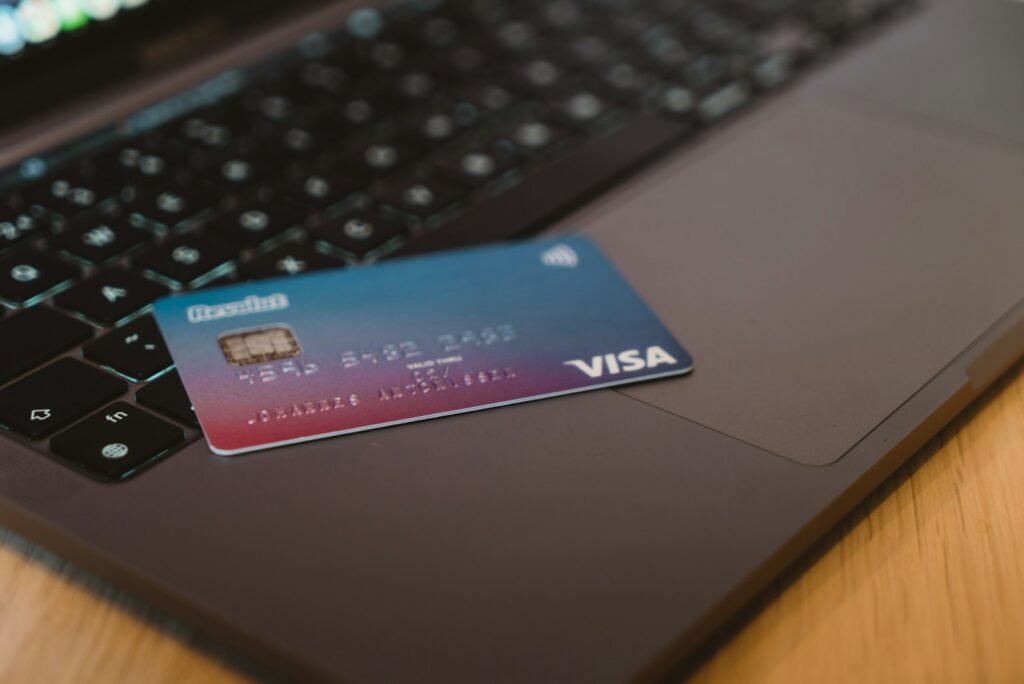
🔒Staying safe when you pay online
Medical bills are a favorite disguise for scams, partly because people are worried about them and partly because the real process is confusing enough that a fake one can look plausible. A few habits go a long way.
- Use the address printed on your statement, or one your provider gave you directly.
- Be careful with unexpected texts and emails that urge you to pay immediately.
- Read the web address slowly. Look-alike sites often change one letter or add an extra word.
- Remember that a padlock icon only means the connection is encrypted, not that the site is the one your doctor uses.
- Never pay with gift cards, wire transfers or cryptocurrency for a medical bill.
- If something feels off, hang up or close the page and call the billing number from your paper statement.
For more on spotting problems, see how to recognize a fake medical payment website and our broader online medical bill payment safety tips. The Federal Trade Commission also publishes consumer scam guidance at consumer.ftc.gov.
🔎Where to go next
💳The PayMyDoctor guide
The naming question, and what to do with searches like “www paymydoctor com”.
💳How to pay a medical bill online
The full step-by-step process, with notes on errors and safety.
📝Reviews
How to evaluate a portal, and our editorial write-ups.
🌐Compare portals
What is the same and what varies between portals.
✨Blog
Deeper guides on billing terms, hospital bills and safety.
❓FAQ
Quick answers to common questions.
❓Frequently asked questions
🌐Is PayMyDoctor Online the official PayMyDoctor website?
No. We are an independent informational website with no connection to PayMyDoctor or to any healthcare provider or payment portal. We cannot take payments, see your account or fix a bill.
💳How do I pay my doctor bill online?
Start with your statement. Use the payment address printed on it, enter the details the page asks for, check that the balance matches, and pay through the secure screen. Save your confirmation. The full process is on our How It Works page.
🔒Is it safe to pay a medical bill online?
It can be, when you use the payment website your provider points you to and check the address carefully. Safety depends on the site you are using.
We cannot verify the security of any third-party portal, so we recommend confirming the address with your provider when in doubt.
🌐Do I need an account to pay?
That varies by provider. Some portals let you pay using details printed on your statement. Others ask you to sign in or register. Your statement or the billing office can tell you.
🧾Why does my bill name a company I have never heard of?
Many practices use outside billing companies or payment vendors, and their names can appear on statements. If you want to be sure, call the number for your provider’s office, which you can find on your insurance card or the provider’s own website, and ask whether the billing company is theirs.
🧾What should I do if I think my bill is wrong?
Hold off on paying. Ask the provider’s billing office for an itemized bill and compare it with the Explanation of Benefits from your insurer. Many errors are corrected with a short phone call.
More answers are on our full FAQ page.
Questions or feedback? Get in touch
Have a suggestion, a correction or a question about this guide? Send us a short note and we will read it. We cannot take payments or look up a specific bill.